§ 01 — Overview

One platform for every technical manual — from first draft to customer receipt.

Ironmark is the technical publications platform for defense and allied industry. Authoring is one part — review, publishing, portal delivery, applicability, parts, support packages, and program-health reporting are the rest. S1000D, MIL-STD-40051, and the S-series ILS suite in a single browser session.

See how it fits together
Standards MIL-STD-40051E/CH1 MIL-STD-40051-3C MIL-PRF-63029J GEIA-STD-0007C S1000D 4.2 · 5.0 · 6.0

No tiers. No hidden costs. No call-for-quote. A branded customer portal ships with every program. Airgap-safe*. Your source XML is always yours.

§ 02

One platform. Four pillars. Everything included.

— Pillar
Author
Review
Trace
Deliver
Purpose

Structured XML authoring.

Schema-aware editor with real-time validation, element completion, and inline error reporting against MIL-STD & S1000D.

Controlled workflow.

Peer review, QA, and approval gates with redline markup, severity tagging, and full review history per cycle.

Cross-standard traceability.

Trace S3000L, S4000P, S5000F, S6000T and GEIA-STD-0007 records to the S1000D or 40051 modules that document them.

Branded customer portal.

Every program ships with a portal — release notifications, receipts, CFI/GFI back-flow, expiring share links, full audit.

§ 03

From checkout to customer receipt.

A controlled workflow that enforces quality gates while letting authors work efficiently. During a 30-day trial, you exercise this entire flow on your own documents.

— Stage
01

Check out

Author checks out a document. Lock prevents concurrent edits. Latest revision opens for edit.

02

Author & validate

Schema-aware editor with element completion, BREX validation, and inline error reporting.

03

Review

IPRF routing to reviewers. Redline markup, inline comments, return-for-work flow.

04

Approve & publish

QA approval gates. Publish to PDF, HTML, or IETP-X. Change bars generated automatically.

05

Distribute

Controlled distribution with copy tracking, receipt confirmation, and LEP generation.

06

Receive

Customer signs in to the portal, acknowledges the revision, and downloads — or receives an expiring share link.

§ 04

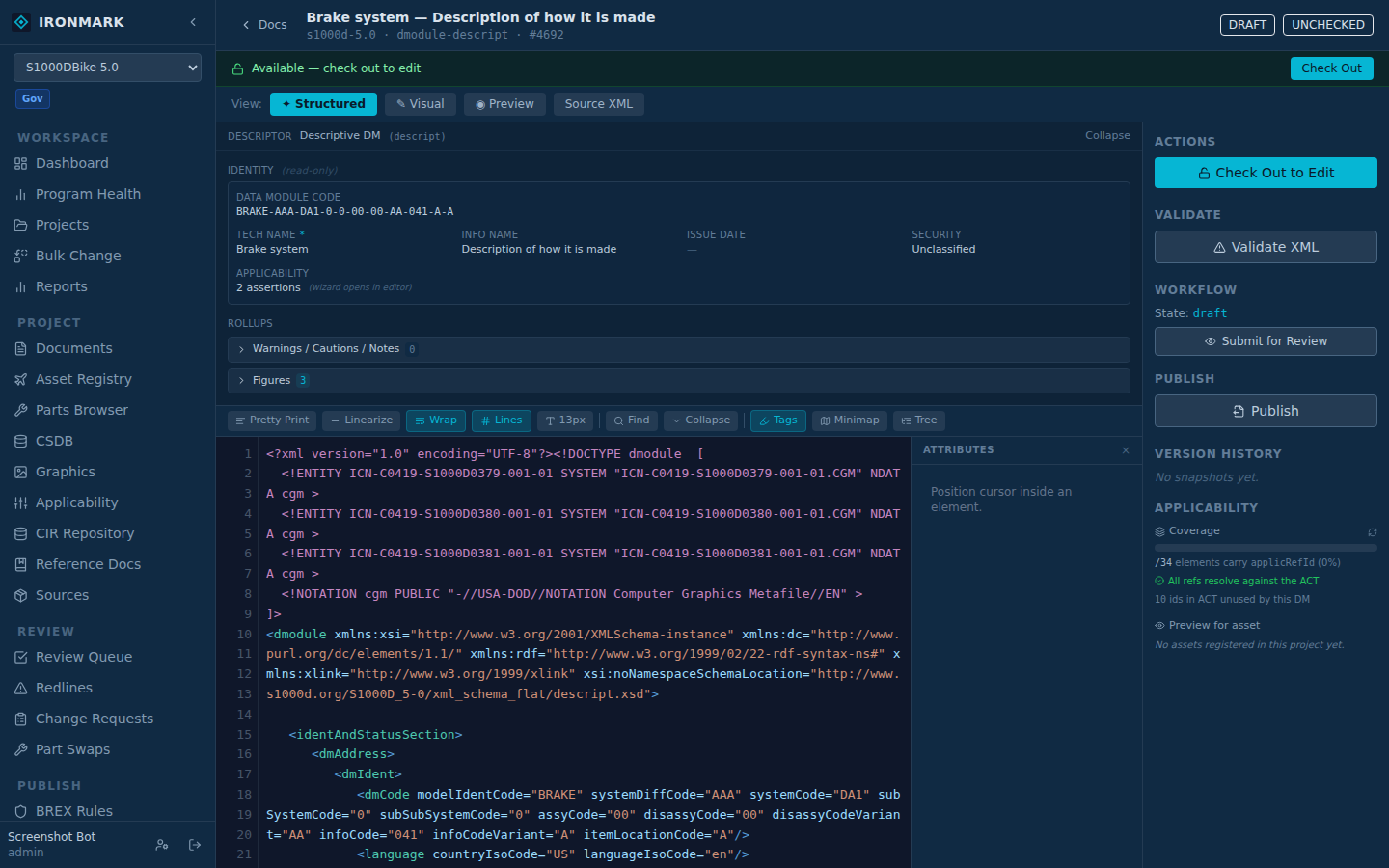
A structured XML editor built for TM standards.

Fig. 4.1 — Editor views

Browser-based, schema-aware editor with context-filtered element completion, real-time validation, and inline error reporting. No desktop installation required.

Fig. 4.1 — Four editor views: structured, visual, preview, and source XML.

  • .01Element palette filtered by active standard and cursor position
  • .02One-click XSD, DTD, and BREX validation with a linked error list
  • .03Structured preview with proper admonition styling
  • .04Check out / check in with exclusive locking
  • .05Change notice and effectivity tracking on every check-in
  • .06CGM, SVG, PNG, and TIFF graphic support with ICN management*

* On CGM. CGM previews are auto-converted for the browser via the built-in cgm2svg pipeline (covering ATA GREXCHANGE, WebCGM, CALS, and PIP profiles). Support in published output — PDF and IETP — depends on the target renderer's CGM handling. See FAQ § 04 (question 4.04) for the current cgm2svg coverage and known limitations.

§ 05

Document library with full version control.

Fig. 5.1 — Document library

Central repository for all technical documents. Browse, search, and filter by type, status, standard, or validation state. Every revision stored with author, timestamp, and change notice reference.

Ironmark document library

Fig. 5.1 — The library, filtered.

  • .01Search and filter by DMC, type, standard, status, or validation
  • .02Version history with element-level structural comparison
  • .03Named baselines for publication milestones
  • .04Side-by-side diff at paragraph, step, table row, and figure level
  • .05HMAC-chained audit log exportable for SIEM integration
§ 06

IPRF review workflow with per-cycle history.

Fig. 6.1 — Review queue

In-Process Review Form workflow with reviewer routing, inline redline markup, per-comment severity + status pipeline, dispute resolution by QA, and aggregate approve/return/reject. On approval, the S1000D issueInfo auto up-issues (configurable per project); on check-in, inWork increments — matches the convention that authoring bumps inWork and approval cuts the next issue.

Ironmark review queue with reviewer routing + severity chips

Fig. 6.1 — Reviewer routing, aggregate decision, cycle-time analytics.

  • .01Peer-review and QA participate during review; assignments carry required/optional status. Aggregate decision doesn't close until every required reviewer responds.
  • .02Structured comments with mandatory / recommended / query severity and an open → addressed / deferred / rejected / disputed status pipeline. Authors can resolve to addressed; only QA/admin can defer or reject a mandatory finding, and authors can flag it disputed to hand off for QA resolution.
  • .03Aggregate review result — Approved, Accepted with Comments, Rejected — plus force-close override for admin/QA with audit-logged disputed-comment count
  • .04Cycle-time analytics report — average review duration, reviewer response time, SLA violations, slowest reviews
  • .05S1000D <issueInfo> auto-bump on approval (project setting, default on); inWork increments on every check-in; full review history per document version and cycle
§ 07

Publish to PDF, HTML, and IETP.

Fig. 7.1 — Publication management

Full manual assembly with cover page, warning summary, LEP, table of contents, all work packages in order, and alphabetical index — in a single PDF. Change bars computed automatically from version history.

Ironmark publication management

Fig. 7.1 — Publications with cycle history.

  • .01MIL-STD-40051 compliant PDF stylesheets via XSL-FO
  • .02Automatic change bars from baseline comparison
  • .03Automatic List of Effective Pages generation
  • .04IETP-X interactive output (S1000D)
  • .05Multiple output profiles per program
  • .06Applicability filtering applied at publish time
§ 08

CSDB with SNS structure and cross-reference tracking.

Fig. 8.1 — CSDB management

Common Source Database with full DMC management, SNS tree visualization, and cross-reference integrity checking. Automatic DMRL generation and SNS gap analysis.

Ironmark CSDB management

Fig. 8.1 — DMC parser, SNS gap analysis, and xref health.

  • .01DMC parsing and validation for S1000D document coding
  • .02SNS tree with gap analysis and suggestions
  • .03Cross-reference extraction and broken-link detection
  • .04Business rule management with BREX integration
§ 09

Write BREX rules with a form, not XPath.

Fig. 9.1 — BREX rule builder

An interactive builder for structureObjectRule entries — pick the target element, scope, allowed values, and messaging from the form, or drop into an XPath escape hatch when the form isn't enough. Dry-run against the project to see what would flag before you commit the rule.

Ironmark BREX Rule Builder

Fig. 9.1 — Existing rules on the left, form + XPath preview on the right.

  • .01Quick-start templates: "element must have an attribute", "attribute must be one of a list", …
  • .02Full XPath escape hatch for rules the form can't express
  • .03allowedObjectFlag semantics surfaced directly in the form
  • .04Test-against-project button before adding a rule to the live BREX DM
  • .05Rules land as regular S1000D BREX data modules — no proprietary rule format
§ 10

Link logistics analysis to technical manuals.

Fig. 10.1 — Traceability matrix

Group projects across different standards into a single acquisition program. Trace GEIA-STD-0007 logistics product data — breakdown elements, maintenance tasks, and provisioning — directly to the S1000D or MIL-STD-40051 data modules that document them.

Traceability matrix — AN/VRC-110 TVCS program

GEIA-STD-0007
PA-201-003
Power Amplifier Module
S1000D
DMC-VRC110-72-00-00
Replace Power Amplifier Module
GEIA-STD-0007
TASK-003
Quarterly Preventive Maintenance
S1000D
DMC-VRC110-00-00-00
Quarterly Preventive Maintenance
GEIA-STD-0007
NSN 5985-01-678-9134
CY-4567 Antenna Coupler
S1000D
DMC-VRC110-00-00-00
Illustrated Parts Data
109 links auto-discovered 3 match types 0.6 – 0.95 confidence
  • .01Program groups associate projects across different SDM families
  • .02Auto-discover links by matching part numbers, NSNs, CAGE codes, and EIAC model identifiers
  • .03Bidirectional navigation — click from logistics data to the procedure, or back
  • .04Traceability matrix report with confidence scoring and coverage statistics
  • .05Manual link creation for non-automatable relationships
§ 11

Applicability wizard + asset registry.

Fig. 11.1 — Applicability

S1000D-native applicability with a coverage bar, orphan-ref check against the project ACT, and preview-for-asset that renders the DM filtered for a specific configuration. Documents list filters by asset so authors and reviewers see only what applies.

Ironmark asset registry

Fig. 11.1 — Asset Registry with sync-from-XML + per-asset preview filtering.

  • .01Per-DM coverage — % of elements carrying applicRefId, unused-id hint, orphaned-ref check against the ACT
  • .02Preview-for-asset — filter the DM through the applicability evaluator for any registered asset; rendered WYSIWYG, not raw XML
  • .03Asset Registry — sync-from-XML scans project ACT/PCT DMs and upserts asset records with a dry-run diff
  • .04Documents-page asset filter — pick a tail number, list narrows to DMs that apply
  • .05MIL-STD-40051 UOC support alongside S1000D applicRefId — element-based condition sources declared per SDM
§ 12

Parts browser with canonical CIR-analog.

Fig. 12.1 — Parts

Cross-DM parts search, browse tree (DM → figure → callouts), and a detail drawer that shows every figure appearance with open-in-editor, part-swap chain, and the project's asset roster. Description drift surfaces where one PN carries N spellings across the TM so QA can canonicalize in one step.

Fig. 12.1 — Two views: cross-DM search and the DM → figure → callouts browse tree.

  • .01Search by PN, NSN, CAGE, or description across every IPD in the project
  • .02Three-level lazy tree (DM → figure → entries), then a collapsible NHA (next-higher-assembly) hierarchy inside each figure — handles large parts catalogs (100k+ entries) without freezing the browser
  • .03Canonical Parts (CIR-analog) — one row per (project, PN, CAGE) with consumable flag; promote from conflicts, link matching entries in one action
  • .04Scan TM — walks project doc XML for partRef / partNumber mentions not yet in the catalog, bulk-import to a chosen DM
  • .05IPD/RPSTL BOM export — CSV and Excel at file and project level; MIL-STD-40051 RPSTL work packages covered via SDM-declared parts_element
§ 13

Content linter with auto-fix.

Fig. 13.1 — Content lint

Ten built-in rules catch the everyday quality drift schemas can't — orphan step references, empty admonitions, non-standard signal words, missing part descriptions, over-long procedural steps. Half the rules auto-fix; the other half report with a link back to the offending element.

Ironmark content linter — per-project findings

Fig. 13.1 — Per-doc modal and per-project Content Quality rollup.

  • .0111 built-in rules — 5 auto-fix, 6 report-only (including stub / empty-document detection) — extensible per SDM via rule registry
  • .02Per-doc modal from the editor with severity tagging and inline element navigation
  • .03Per-project bulk summary — Content Quality report tab shows worst-offender docs and the top rules firing
  • .04Project-wide “Lint Project” report opens from the Documents page — per-doc counts plus the top rules firing across the whole project
  • .05Stub & empty-document detection — bodies under a threshold flagged (import leftovers)
§ 14

PM dashboard for delivery pacing.

Fig. 14.1 — Reports

Twelve-week check-in velocity, aging review-queue buckets, publish-failure streak detection, and a Legacy Conversion burn-down (for programs running a migration in parallel). Deliberately shipped without a composite productivity score — read the signals together, don't rank the authors.

Ironmark PM dashboard

Fig. 14.1 — Velocity, aging, publish-failure streaks.

  • .01Check-in velocity — project-level series by week (checkins + chars added), median WP-size band for calibration
  • .02Per-author drill-down — three signals side-by-side (no leaderboard); WP-type mix so a single long troubleshooting WP isn't compared to twenty generals
  • .03Aging redlines — 0–7 / 8–30 / 31+ day buckets on the open review queue
  • .04Publish-failure streaks — docs whose last N publish attempts all failed, grouped by error class
  • .05Cross-tab Reports — Parts hygiene (missing NSN, description drift, consumable candidates), Applicability coverage, broken-link ownership rollups, stub-doc detection
§ 15

Support packages with tiered encryption + one-way sanitize.

Fig. 15.1 — Support packages

Three distribution tiers (unclassified ZIP, CUI AES-256-GCM, ITAR/EAR with 16-char passphrase and SHA-256 integrity). Full-nuke sanitize option scrubs every attribute value and text node except the structural allowlist — cross-doc links, part where-used, applicability, and validation behavior all preserved so the recipient can reproduce a defect without seeing proprietary content.

Ironmark support packages

Fig. 15.1 — Tier picker with compliance banner + sanitize + PDF cover report.

  • .01Three tiers — plaintext ZIP, AES-256-GCM encrypted, ITAR-controlled with mandatory passphrase and package SHA-256 recorded
  • .02Full-nuke sanitize — consistent-fake substitution for PN / CAGE / NSN / serial / tail / modelIdentCode; text bodies replaced with length-preserving lorem-ipsum
  • .03Preview-one-file before generating — side-by-side original vs. sanitized with scrub counts (attrs / texts / distinct-id remaps)
  • .04S1000D DMC filename rewriter — modelIdentCode segment swapped to match the sanitized XML; JGP-structural components kept
  • .05PDF cover report with manifest, included DMs, omitted-per-tier register, and integrity table
  • .06Compliance banner — encryption and audit are tools, not authorization; local rules govern
§ 16

Customer feedback with DA-2028 intake + DM association.

Fig. 16.1 — Feedback

Customers file DA Form 2028 / civilian redlines from their portal with page / paragraph / line / figure / table locators. Staff triage via a pipeline (submitted → triaged → accepted / rejected / duplicate / closed), attach the 2028 to one or more DMs, and the Documents view surfaces an open-feedback count with a filter — the ask lands on the author's list, not in a mailbox.

Ironmark customer feedback triage

Fig. 16.1 — Portal intake, staff triage, DM association.

  • .01DA-2028 form on the customer portal with structured locators + free-text recommendation and reason
  • .02Staff triage modal — status pipeline, internal notes, customer-visible resolution
  • .03DM association — link one 2028 to N DMs from a scoped picker (program's projects only)
  • .04Documents view — per-DM count badge + "has open 2028s" filter, scoped to the current cycle
  • .05Email notifier — admins (or a per-instance override address) notified on new submissions
§ 17

IADS-compatible delivery. Keep your downstream unchanged.

Fig. 17.1 — IADS Builder

Ironmark exports packages compatible with existing IADS-based delivery workflows, so a program can adopt a different authoring and repository platform without requiring immediate changes to downstream consumers. A visual builder scopes the content, orders the TOC, and produces the standard dataset.xml — plus a nested toc.xml for non-S1000D projects — that IADS packaging documentation describes.

Ironmark IADS Builder

Fig. 17.1 — Custom TOC editor with depth controls.

  • .01Dataset metadata form — weapon system, revision, publish date, service branch, security marking
  • .02All-content or pick-individually document selection
  • .03Nested TOC editor with depth controls — chapters, sections, entries
  • .04Or upload your own toc.xml built externally
  • .05Automatic exclusion of non-content types (DDN, BREX, catalog) from the visual builder
  • .06S1000D projects use the Publication Module for navigation; a separate TOC file isn't required
§ 18

Controlled distribution with receipt tracking.

Fig. 18.1 — Controlled copy register

Maintain a register of every controlled copy issued. Track receipt confirmation, manage supersession and recall, and monitor expiry dates with automatic notifications.

Controlled copies register

Fig. 18.1 — Numbered copies with receipts and transmission references.

  • .01Numbered controlled copies with classification markings
  • .02Receipt confirmation and transmission reference tracking
  • .03Supersession with automatic replacement issuance
  • .04Expiry notifications with configurable lead time
  • .05Full chain-of-custody audit trail per copy
§ 19

Named snapshots you can compare, re-publish, or ship.

Fig. 19.1 — Baselines

A baseline freezes every document's version at a point in time and carries a contract reference. Re-publish from a baseline for a re-issue, diff two baselines to see what changed between deliveries, or bundle multiple baselines into a single export archive with per-baseline subdirectories.

Baselines page

Fig. 19.1 — Named baselines with contract references.

  • .01Named, locked snapshots with contract references (CDRL number, delivery ID)
  • .02Re-publish or re-export from any baseline without disturbing head
  • .03Compare a baseline against the current head, or two baselines head-to-head — per-document version diff plus added / removed / changed documents between the two points in time
  • .04Multi-baseline export archive: each baseline in its own subdirectory, graphics shared at the root
  • .05Change-bar rendering can reference any baseline as the diff origin
§ 20

Program health at a glance.

Fig. 20.1 — Dashboard

Real-time dashboard for program managers showing document status, review pipeline, team activity, and automated alerts for overdue reviews and expiring copies.

Ironmark dashboard

Fig. 20.1 — Counts, pipeline, workload, and alerts.

§ 21

Your customers sign into your portal.

Optional. The portal ships with every install because most programs find it convenient, but nothing here requires it. Hand off deliveries any way the contract stipulates — email, SFTP, hard drive, whatever your program already runs on. Ironmark produces the deliverable; the transport is your call.

Fig. 21.1 — Customer program list

Every program ships with a branded, customer-facing portal. Assigned customers see the current revision set, acknowledge receipt against a specific revision, and download the package from a URL you own — not a vendor's.

Deliverables portal — programs list

Fig. 21.1 — Subscribed program showing an outstanding acknowledgment.

  • .01Per-program access grants — individual users or named recipient lists
  • .02Release-note visibility and full prior-revision history on every deliverable
  • .03Receipt confirmation gated by an ack-before-download setting when contractually required
  • .04Email release notifications when a new revision is promoted
  • .05CFI/GFI back-flow — customers upload furnished info against the program record
  • .06Expiring, use-capped share links for contacts without portal accounts
  • .07Every download logged with user, IP, and timestamp for audit
  • .08Custom wordmark, logo, accent color, and CSS per install — airgap-safe, no CDN dependencies
Fig. 21.2 — Program detail

Deliverables table with release notes on every revision, full history, downloads gated to acknowledgment when required, and a customer-side upload panel for CFI/GFI — visible to the contractor team from the same program record.

Deliverables portal — program detail

Fig. 21.2 — Expanded deliverable with release notes and prior revisions.

Fig. 21.3 — Contractor view

The internal Deliverables page groups every program's release history in one view. Compare revisions, promote or supersede, mint expiring share links, or review the CFI/GFI a customer has pushed back — without leaving the platform.

Contractor deliverables page

Fig. 21.3 — Contractor page with incoming CFI/GFI panel.

* On air-gap deployments. "Airgap-safe" here means the portal software has no CDN dependencies, no telemetry, and no outbound network calls of its own — it runs fully offline like the rest of Ironmark. It does not guarantee that external customers can reach a fully isolated deployment: reachability depends on your network configuration (VPN, reverse proxy, mTLS gateway, bastion host, or whatever inbound path your policy allows). Pure air-gapped installs typically use out-of-band delivery instead — see § 17 IADS-compatible packages or § 26 Exit doors.

§ 22

Built for controlled environments.

Ironmark operates with zero outbound network connections by default. No CDN dependencies, no telemetry, no cloud calls. Designed from the ground up for air-gapped and restricted networks. Optional dependency vulnerability scanning can be enabled by administrators when network policy permits.

— Area
Authentication
Compliance
Usability
Standards
  • Local username / password
  • FIDO2 / WebAuthn (YubiKey)
  • PKI via nginx mTLS
  • NIST 800-171 security controls
  • HMAC-chained audit log
  • NDJSON export for SIEM
  • Air-gap compatible (zero outbound calls)
  • On-premise or managed US hosting
  • Custom portal branding is airgap-safe (no CDN)
  • Dark / light themes, per user
  • High-contrast mode (~7:1)
  • Configurable text size
  • Reduce-motion toggle (+ OS)
  • Keyboard navigable
  • Semantic-HTML landmarks
§ 23

Everything included. No add-ons.

Every license includes the full platform. There are no feature tiers, no per-document fees, and no hidden costs. Every capability below ships on day one.

— Domain
Import / Export
Customer Delivery
Authoring & Validation
01Row A

IADS import & IADS-compatible export

Streaming import of existing IADS packages. IADS-compatible export via the IADS Builder so a program can adopt Ironmark without changing downstream delivery to IADS-based consumers.

Customer portal

Branded, per-program customer view with per-user or group-based grants, revision receipts, release-note email notifications, and airgap-safe branding*. Every install ships with it.

BREX validation

Two-tier business rules engine with XPath evaluation against project-specific BREX data modules. Real-time validation in the editor.

02Row B

Bulk operations

Bulk import from CSV, Excel, or DMRL. Cross-library find-replace with regex, XPath, and XSLT modes. Per-document rollback.

CFI / GFI back-flow

Customer-furnished / government-furnished information uploaded by the customer against the program record. Contractor team sees uploads with uploader identity, timestamp, and audit trail.

PM Builder

Drag-and-drop Publication Module editor for S1000D. Chapters, sections, and DM references with automatic XML generation.

03Row C

Cross-standard traceability

Tie S3000L LSA, S4000P PMA, S5000F ISF, S6000T training, and GEIA-STD-0007 provisioning to the S1000D and MIL-STD-40051 manuals that document them.

Recipient lists

Named groups of customer contacts. Attach a list to a program and every member inherits access. Add or remove members and grants flow through instantly.

TOC Builder

Drag-and-drop table-of-contents editor for MIL-STD-40051 and non-S1000D projects. Auto-generate from document library.

04Row D

CIR repository

Common Information Repository for shared warnings, parts data, torque values, and references across multiple documents.

Expiring share links

Signed download URLs for contacts without portal accounts. Time-based expiry, optional use-count cap, revocable at any time. Every fetch audit-logged with IP and timestamp.

In-app IETP preview

Preview tool for authors and reviewers during development — collapsible navigation, search, graphic zoom, cross-reference linking. Deliver to customers as IADS-compatible packages or IETP-X for their own viewer of choice.

05Row E

Graphics management

ICN assignment, format tracking, and CGM-to-SVG conversion. Reference management across the document library.

Stylesheets

SDM-bundled and customer-uploaded stylesheets. XSL-FO for PDF, XSLT for HTML. Multiple output profiles per program.

Reporting & analytics

Cross-reference integrity, graphics audit, document health, change activity, and publish history. Excel and PDF export.

§ 24

Transparent, seat-based pricing. Rate locked through 2027.

Every license includes the full platform — no tiers, no per-document fees, no add-ons, no call-for-quote. On-premise term license; managed hosting and perpetual options available.

Seats
05 seats
$4,200
$840 / seat · yearly
10 seats
$7,500
$750 / seat · yearly
25 seats
$16,000
$640 / seat · yearly
50 seats
$26,000
$520 / seat · yearly

Rates locked through December 31, 2027. Every capability listed above ships to every seat.

§ 25

Your rate is locked. The platform keeps improving.

Since rates were locked on March 18, 2026 and guaranteed through December 31, 2027, the following major capabilities have shipped to every licensed instance during routine maintenance — at no additional cost.

— Since
Q1 2026
A · 2026-Q1

Cross-standard traceability — full ILS lifecycle

Automatic bidirectional lookups across S3000L, S4000P, S5000F, S6000T, and GEIA-STD-0007 — tied to the S1000D data modules and MIL-STD-40051 work packages that document each task. Links resolve by part number, NSN, CAGE, and EIAC model identifier, with confidence scoring and a coverage matrix.

B · 2026-Q1

NIST SP 800-171 compliance (CUI)

Secure handling of Controlled Unclassified Information. Password policy enforcement, account lockout, HMAC-chained audit logging, AES-256-GCM encrypted support packages, and an XSLT sandbox to prevent data exfiltration through stylesheets.

C · 2026-Q2

Deliverables Portal — full customer-facing delivery

A branded customer portal shipped with every program: revision releases with notes, receipt acknowledgment, CFI/GFI back-flow, per-program recipient lists, email notifications on release, expiring share links, and a complete per-download audit trail. Portal chrome is configurable per install — airgap-safe*.

D · 2026-Q2

IADS Builder & multi-format export

Every project can now be exported three ways: an IETP-X package, an IADS-compatible package via the new IADS Builder (for programs whose downstream delivery targets an IADS-based pipeline), or a plain archive with per-baseline subdirectories.

E · 2026-Q2

Interactive BREX rule builder

Author BREX structureObjectRule entries from a form: target element, scope, allowed values, and severity. Quick-start templates cover the common patterns; an XPath escape hatch handles the rest. Dry-run against the project before committing.

§ 26 — Exit doors

Three ways out. Zero conversion loss.

Every project can be exported in one click — as an S1000D IETP-X package, an IADS-compatible package for existing IADS-based delivery pipelines, or a plain archive with per-baseline subdirectories. Your source XML is always yours, with no re-authoring or paid migration if you decide to leave.

— Format
01 · Standards

IETP-X

The S1000D standard interchange package. Opens in any conforming viewer — NIVOMAX, IrisView, ONEIL, Xignal, or whatever tool the customer standardises on.

02 · Compatible

IADS-compatible package

An IADS-compatible package your existing IADS-based delivery pipeline accepts, so switching authoring platforms doesn't force a downstream migration.

03 · Portable

Plain archive

ZIP or tar.gz with documents/, graphics/, and per-baseline subdirectories when you pick more than one revision. Human-readable manifest.

Not a "premium" tier. Not a paid module. Every install can produce all three formats from day one.

§ 27

Request a 30-day trial or send sample documents.

Let's talk about your program.

Whether you're evaluating a new authoring platform, planning a migration off legacy tools, or trying to bring a controlled distribution workflow into a single platform — we're happy to spend time understanding your specific situation before any sales conversation.

Email
info@ironmark-authoring.com
Free sample review

Send 5–10 Word or SGML documents for a free migration assessment. Written report and fixed-price quote returned within 5 business days.